How To Add Friends In Monopoly GO?
There are three ways to add friends in Monopoly GO:
- Via Contact List
- Through Facebook
- By Sending an Invitation Link
- By Find Them Through Their Codes
Players can access these options by going to the bottom right corner of their game screen and selecting ‘Friends‘ From there, they can select Contacts, Facebook, or Invite Link.
Contact List
Connect your phone’s contact list to Monopoly GO and add friends. While not everyone favors this system, it allows you to connect with friends via your number. Players must share their phone number and access their contact list.
This way, friends who have just downloaded the game will be automatically added. After linking your contacts with Monopoly GO, you can unlink them by going to the game’s permissions.

To Invite Friends In Monopoly GO via contacts:
- Open your Monopoly GO app and tap the Friends button in the bottom right corner. The icon is a pair of hands shaking.
- You will see the Friends & Family section. Select the Add Friends tab.
- Tap on Contacts, which is orange with a telephone icon.
- Press the Add Contacts button and input your mobile number.
- A popup will ask if you want to connect with people on your contacts list. Hit Continue, verify your number, and give the required permissions.
- After entering your phone number, any contacts you have who are also playing Monopoly GO will be added immediately. You will see all the players from your contacts in the “Add Friends” section in Monopoly Go.
- Tap “Add” to send them friend requests.
The second step is via Facebook. This is simple as you will already connect the game via the app. If not, you need to connect to Facebook via the menu options and add friends already playing Monopoly GO.
The most convenient method to add friends in Monopoly GO is through Facebook. This saves you the trouble of sending invites to your friends one by one. Every friend in your Facebook friend list who plays Monopoly GO will be automatically added.
All you need to do is link your Facebook account with Monopoly GO, and the job is done. This is the perfect option for players who are not comfortable sharing their phone numbers. I’m sorry, but there is no text provided for correction. Please provide the text you would like me to correct.
To Add and See Your Facebook Friends In Monopoly GO:
- Launch the application and go to the Friends section. The icon is a pair of hands shaking.
- Tap the Facebook button. It’s the middle one at the bottom after entering the Friends menu, blue with a Facebook icon. Use this option to friend people who already play the game and are on your Facebook friends list.
- Select Add Friends. If you have a linked Facebook account, you will see suggestions from your Facebook friends list.
- If you don’t see a Facebook option, it means your Facebook account is not connected to Monopoly Go. Tap the Connect button to link your Facebook and view suggestions.
- Tap the Confirm button. A popup will request permission to connect to your Facebook account. The game needs access to your public profile to identify which of your friends play Monopoly GO.
- After connecting your Facebook account, any friends also playing Monopoly GO will be added immediately.
Invite Link
If you have friends who haven’t tried Monopoly GO, you can send them the invite link. Opening the link will take them to the store page where they can download and install the game on their phones.
Just copy the invite link and share it with your friends on any messaging app. As soon as they install the game, they will be added to your friends list.
To Do This:
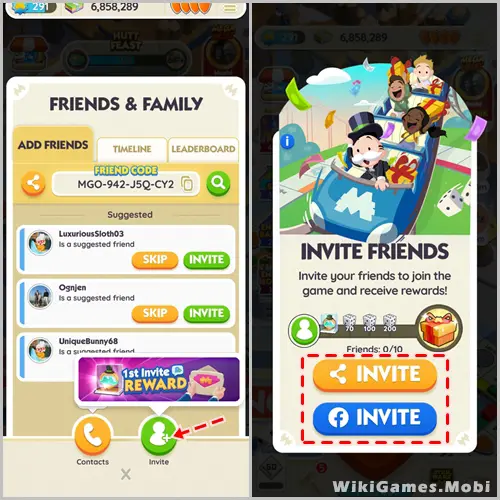
- Tap the Friend’s menu in the bottom-right corner and select the Invite option.
- You can invite new friends who don’t play Monopoly GO. Read the on-screen instructions for invite details and choose the Add Friends option.
- Select an invitation button to send to your friend. The yellow invite button generates a link you can share, and the blue invite button sends a Facebook invite.
- When tapping the yellow share button, you can choose to send the link directly via text message or other messaging apps.
- Once they install the game, you’ll automatically become friends. Once you have added friends using any of the above methods, you are free to explore and perform various activities with them. Competing, opening Community Chests, and checking their statuses are some ways to interact with friends in this game.
These were all the methods to invite, add, and play Monopoly Go with friends. If you are interested in Monopoly Go guides, we have a vast list of them. Start with how to get free Dice Rolls.
Through Their Codes
If you have your friend’s code, you will be able to add them as a friend in the game. Once you have your friend code, go to the Friends section at the bottom corner of the screen and type the code in the search icon located in the top right corner of the “Add Friends” tab to find them in the game.
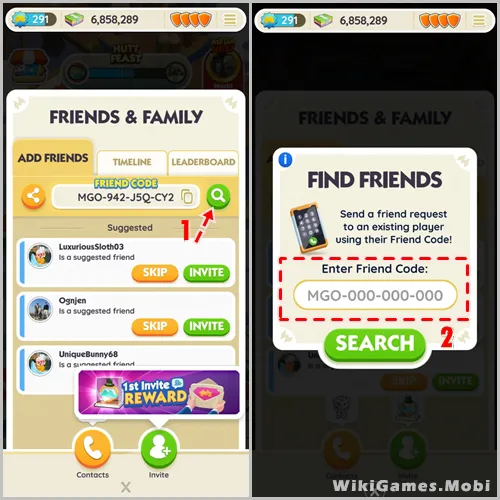
On the other hand, you can copy your code and send it to them to add you if you would like to share your code without confusion.
Rewards For Inviting Friends In Monopoly GO
Invite friends to join you on Monopoly GO! And earn rewards. Simply share your link with them, and once they’ve installed and started playing, they’ll automatically be added to your in-game friend list.
Tip : By inviting friends to play via your 'invite' link, you can earn up to 150 free dice rolls and a token. Keep in mind that a reward will only be received for friends who are new to Monopoly GO!
Viewing And Managing Friends In Monopoly GO
Once you’ve successfully added friends using any of the three methods provided, you can easily view and manage your friends within the Friend menu.
Simply click on the Friends icon as mentioned in the previous steps, and then click on the leaderboard submenu to view the list of your friends and the levels they have reached in-game.
If you wish to remove a friend, click on their profile, and a red Remove button will appear. Click on it. It’s worth noting that adding friends gives you the opportunity to earn free dice rolls. Expanding your friends list using all Four methods mentioned earlier would grant more rolls.