One of the best ways to communicate in a game or on any platform is by using emojis. Monopoly GO fans now have something to be excited about with the addition of these emojis. In this guide, we’ll explore how to get and use them.
What are Monopoly Go Emojis?
Emojis are animated images that you can attach to social actions in the game. They can be sent, received, earned, or collected during gameplay.
Emojis are similar to shield skins and tokens. This means you can get rewards from collecting emojis, as they are saved in your Showroom, and there are multiple tiers on the shelves you can complete.
How To Get Monopoly Go Emojis?
The only way to get emojis is by participating in different tasks and events, where they are part of the reward pool.
Not all events guarantee an emoji as a reward, so keep an eye out whenever a new event drops.
You can potentially obtain emojis from the following some activities:
- Quick Wins
- Partner Events
- Limited-time Events
- Daily check-ins
There are usually conditions to meet for each of these alternatives, though it is not a perfect science. Whether you receive an emoji will ultimately depend on the reward pool for each activity.
How To Access Emojis?
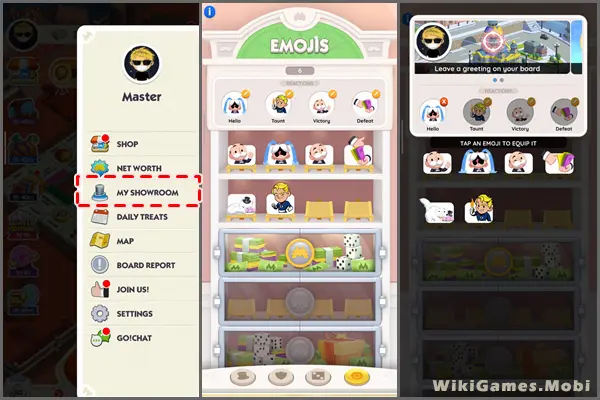
To view the emojis you have unlocked:
- Click on the three-bar button in the upper-left corner of the screen.
- From the menu options, select “My Showroom” In the showroom.
- Click on the third button to open a gallery displaying all available emojis.
How To Use Monopoly Go Emojis?
In Monopoly GO, use emojis to react while performing actions like shutting down someone’s landmarks or conducting a bank heist. After performing these actions, tap the small orange icon near your player portrait to bring up your list of emojis.
Once you pick an emoji, it will send it to the other player, allowing them to see your reaction.
Follow These Steps:
- After you finish the raid, the screen where you can tap the “Collect” button will appear. You will notice your player portrait on this screen, with a tiny yellow circle and a smiley face above it.
- Select the button above your portrait, and the emoji tray with all the emojis you have collected will appear.
- Choose the emoji you want to use.
- Done! You’ve now left an emoji as a speech bubble for the player you just attacked to find.
During partner events, you can use emojis to react as you spin your points wheel or reach a milestone to interact with your teammates. This way, you can express your joy at receiving a new reward or frustration at being just a few points away from winning.
You can send emojis in Bank Heists, Shut Down Success, Shut Down Blocked, Sticker Sends/Trades, and Co-op Partner situations.