You may ask yourself about Monopoly GO Stars and their relationship with stickers in Monopoly GO. All of these questions will be covered in this post. Let’s get started.
What are Monopoly GO Stars?
Stars in Monopoly GO represent the total star value of your duplicate stickers. For example, if you have two stickers and each has three stars, you have six stars in total. If you gift a sticker that the other player already owns, this duplicate transforms into stars based on the sticker’s star value.
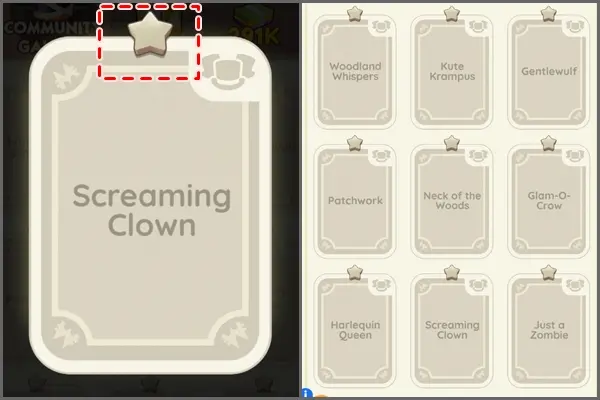
To view this sum, navigate to the “Stickers for Rewards” section in the game menu under Album. Then click on the blue safe icon at the bottom right of the screen to access this area.
There, you can exchange stars for safes, which contain dice and sticker packs. That means stars are actually your stickers, and trading stars is equivalent to trading stickers.
How To Trade And Send Monopoly GO Stars?
Trading stars in Monopoly GO involves sending stickers as substitutes, as direct star transfers aren’t possible. For instance, if a player requests 10 stars, you can fulfill this by sending a combination of stickers totaling 10 stars.
If they haven’t specified any particular stickers, they likely have all the available ones for trade. In that case, any sticker you send will be extra for them, automatically converting into stars and successfully completing your trade.
We have two options to trade our stars in Monopoly GO :
- The first method is sending stickers to your friends or other players in exchange for missing stickers to complete your set.
- The second way is using the “Stickers For Rewards” feature to obtain new stickers and extra rewards by exchanging them for sticker packs. Let’s dive into this deeply!
Trading Monopoly GO Stars With Players
To trade your sticker’s stars with another player in Monopoly GO:
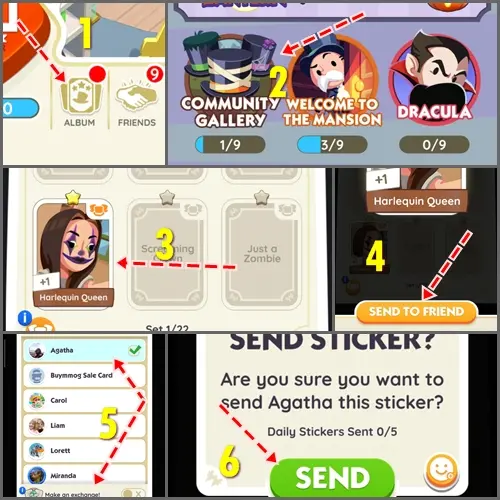
- Open Monopoly GO.
- Add the other player as a friend if they’re not already; star trades are friends-only.
- Click the “Album” button, right of your dice count.
- Open a set with duplicate stickers.
- Select the sticker you want to send.
- Hit the orange “Send To Friend” button.
- Find and select the friend from the list, or use the search function.
- Confirm by tapping “Continue” and then the green “Send” button.
- Repeat the process for the agreed number of stars.
- Finally, ask your friend to send the specific sticker you need to complete the trade.
Trading Stars Via Stickers For Rewards
The ‘Sticker For Rewards‘ is useful for a player who already has an almost complete album and can accumulate duplicates to receive the pink safe, which guarantees a sticker they don’t own yet, especially for missing Gold Stickers.
The lowest value is around 100 stars for exchange, with the most valuable crate at 1,000 stars. The rewards range from a few hundred dice to wild stickers, making it worthwhile to save up your stars for higher-tier sticker packs.
On the other hand, players who lack a few tradable stickers can obtain the exact ones they need with far fewer stars than the minimum 100 required in the ‘Sticker for Rewards’ exchange.
Instead of spending 100 stars for a random One-Star Sticker Pack from the green safe, a more effective strategy would be to seek out players who have the four or five-star stickers you need.
You could offer them 10 or 20 stars per sticker. For the player receiving your stars, this exchange effectively increases the value of their four or five-star sticker to 10 or 20 stars, bringing them closer to accumulating enough stars for a safe that guarantees a sticker they don’t have. This method benefits both parties and uses duplicates more effectively.