In Monopoly Go, some players may continuously shut down your landmark, and you may want to block them. This guide explains how to remove someone on Monopoly Go.
Is it possible to block someone on Monopoly Go? No, you can’t block a player on Monopoly Go. However, you can remove them as a friend, which is the next best thing.
How To Remove Someone On Monopoly Go?
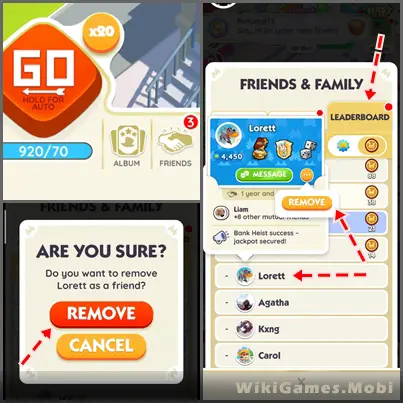
- Open the Monopoly Go game.
- Tap the “Friends” tab in the bottom right corner.
- Tap the “Leaderboard” tab.
- Open the “Friends” list.
- Scroll and find the friend you want to remove.
- Tap and hold the friend’s name until the “Remove” option appears.
- Tap the “Remove” button and confirm the removal.
- The players you remove will be instantly removed from your list.
- You may repeat this process as many times as you like, with as many friends as you want.
One effective practice to avoid continuous attacks on your landmark is to remove players from your friends list. However, you cannot prevent attacks from players who are not on your friends list.